

Routing internal network traffic through an intermediary proxy gateway requires precise configuration to prevent routing loops, information disclosure, and performance degradation. Failing to correctly isolate local subnets or ignoring script validation during deployment introduces severe vulnerabilities to your infrastructure.
Immediate Architectural Checklist
- Manual Verification: Confirm your target gateway IP address and port access (
8080,3128) usingnc -zv [Proxy_IP] [Port]before modifying your operating system rules.- Internal Isolation: Always define local bypass configurations using standard CIDR notation or wildcard lists (
*.local,10.0.0.0/8) to stop internal requests from leaking outward.- Script Enforcement: Validate your Proxy Auto-Configuration (PAC) file syntax with JavaScript strict parsers before pushing policies out to production endpoints.
Architectural Taxonomy: Choosing the Correct Intermediary
You cannot implement an effective proxy infrastructure without matching the network topology to your organization’s functional requirements. Intermediary servers are classified by how they handle data and where they sit in the network path.
Forward Proxies vs. Reverse Proxies
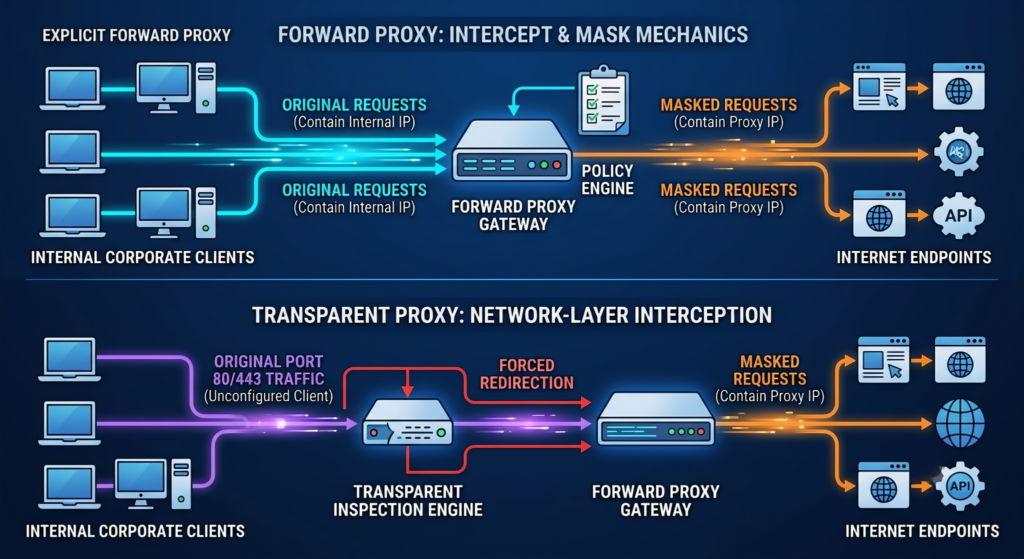
A Forward Proxy sits directly in front of client devices. When an internal user initiates an outbound request to an external internet endpoint, the forward proxy intercepts the transaction, evaluates policy controls, masks the client’s internal IP address, and relays the request.

Conversely, a Reverse Proxy sits in front of web servers. It acts as an edge gateway that receives inbound external internet traffic, offloads TLS termination, handles load balancing, and safely routes traffic to your internal application backend infrastructure.
Transparent Proxies vs. Explicit Proxies
An Explicit Proxy forces client applications to be explicitly configured to point to the proxy’s IP and port. Traffic is intentionally directed to the proxy at the application layer.
A Transparent Proxy intercepts traffic at the network routing layer without requiring any client-side operating system configuration. Using inline network appliances or policy-based routing on Layer 3 firewalls, all outbound port 80 and 443 traffic is forcefully diverted straight to the inspection engine.
Cross-Platform Configuration Blueprints
1. Windows 11 Enterprise Framework
Windows handles proxy routing globally at the system component level using the WinHTTP and WinINet integration stacks.
Step-by-Step Manual UI Configuration:
- Press
Windows Key + Isimultaneously to call up the Settings engine. - Navigate to the left navigation index, select Network & internet, then choose Proxy.
- Locate the Manual proxy setup module and select the Set up control.
- Toggle Use a proxy server to On.
- Input the primary gateway hostname (
gw-primary.thepickupdiary.com) or explicit destination IPv4/IPv6 address alongside the designated network port. - Populate the exception exclusion boundary array using explicit trailing semicolons:
*.local;*.lan;10.*;192.168.* - Check the box labeled Don’t use the proxy server for local (intranet) addresses to protect your local internal routes. Click Save.
Headless PowerShell System Enforcement:
For automated deployment or headless Windows Server management, use the system registry profile to bind proxy values directly:
# Enforce Explicit System-Wide Proxy Settings via Registry
Set-ItemProperty -Path 'HKCU:\Software\Microsoft\Windows\CurrentVersion\Internet Settings' -Name ProxyServer -Value "gw-primary.thepickupdiary.com:8080"
Set-ItemProperty -Path 'HKCU:\Software\Microsoft\Windows\CurrentVersion\Internet Settings' -Name ProxyEnable -Value 1
Set-ItemProperty -Path 'HKCU:\Software\Microsoft\Windows\CurrentVersion\Internet Settings' -Name ProxyOverride -Value "*.local;*.lan;10.*;192.168.*;<local>"

# Force WinHTTP Stack Update to Align with WinINet Changes
netsh winhttp import proxy source=ie
2. macOS Darwin Environments (UI & Terminal)
macOS manages network interface proxies on a per-adapter basis. Changing your Wi-Fi interface settings will not automatically apply to a wired USB-C or Thunderbolt Ethernet connection.
Related: What Is a Man-in-the-Middle Attack?
Automated Terminal Policy Enforcement (networksetup):
Using the command-line utility provides consistent behavior across administrative deployment scripts without relying on the system preferences GUI.
# Set Web Proxy (HTTP) and Secure Web Proxy (HTTPS) for Wi-Fi interface
sudo networksetup -setwebproxy "Wi-Fi" gw-primary.thepickupdiary.com 8080
sudo networksetup -setsecurewebproxy "Wi-Fi" gw-primary.thepickupdiary.com 8080

# Configure Domain Bypass and Subnet Ignored Destinations
sudo networksetup -setproxybypassdomains "Wi-Fi" *.local *.lan 10.0.0.0/8 192.168.0.0/16

# Verify Active Configuration Status
networksetup -getwebproxy "Wi-Fi"
GUI Step-by-Step Path:
- Click the Apple Menu in the top left and select System Settings.
- Click Network in the sidebar, choose your active network adapter interface (e.g., Wi-Fi), and select Details.
- Scroll down to the Proxies configuration sub-tab.
- Toggle Secure Web Proxy (HTTPS) to active. Input the server endpoint hostname and matching network port.
- Enter your authentication credentials if the upstream proxy engine enforces explicit access controls.
- Populate the Bypass proxy settings for these Hosts & Domains textarea with your target structural subnets. Click OK.
3. Enterprise Linux & Headless Environments
Linux applications rely on system environment variables to inherit network routing instructions. These rules must be specified explicitly in configuration profiles to ensure persistence across shell lifecycles.
To configure system-wide proxy definitions, append these explicit variable declarations to your /etc/environment configuration file:
# System-Wide Persistent Environment Configurations
# Target File Path: /etc/environment

http_proxy="http://gw-primary.thepickupdiary.com:8080/"
https_proxy="http://gw-primary.thepickupdiary.com:8080/"
ftp_proxy="http://gw-primary.thepickupdiary.com:8080/"
no_proxy="localhost,127.0.0.1,*.local,*.lan,10.0.0.0/8,192.168.0.0/16"

# Export Uppercase Variations to Ensure Compatibility with Stricter Legacy Utilities
HTTP_PROXY="http://gw-primary.thepickupdiary.com:8080/"
HTTPS_PROXY="http://gw-primary.thepickupdiary.com:8080/"
FTP_PROXY="http://gw-primary.thepickupdiary.com:8080/"
NO_PROXY="localhost,127.0.0.1,*.local,*.lan,10.0.0.0/8,192.168.0.0/16"
To configure package management subsystems exclusively (such as isolated build pipelines), avoid setting global environment variables. Instead, isolate the logic inside your package manager’s runtime definitions:
# Debian/Ubuntu Advanced Package Tool Explicit Rule Configuration
# Target File Path: /etc/apt/apt.conf.d/99proxy
Acquire::http::Proxy "http://gw-primary.thepickupdiary.com:8080/";
Acquire::https::Proxy "http://gw-primary.thepickupdiary.com:8080/";

# RedHat/RHEL/Fedora Package Management Configuration
# Target File Configuration Block inside: /etc/dnf/dnf.conf
proxy=http://gw-primary.thepickupdiary.com:8080
4. Mobile Operating Systems (iOS & Android Frameworks)
Mobile devices interpret proxy rules at the individual network interface layer. Like macOS, settings applied to a specific Wi-Fi network will not automatically apply to cellular data connections or alternate Wi-Fi access points.
iOS (iPhone & iPad) Manual Routing:
- Open the Settings app and select Wi-Fi.
- Locate your active connected network and tap the Information icon (i) on the right.
- Scroll to the bottom of the interface and tap Configure Proxy under the HTTP Proxy block.
- Select Manual to enter your target IP address and port, or select Automatic and enter your hosted script path in the URL field (e.g.,
http://wpad.thepickupdiary.com/wpad.dat). - Tap Save in the top right corner to enforce the network routing path.
Related: Top 10 Dark Web Browsers for Secure Tor Browsing
Android Enterprise Native Setup:
- Navigate to Settings and select Network & Internet, then choose Internet.
- Tap the Settings gear icon next to your active Wi-Fi connection.
- Select the Edit/Modify icon (typically a pencil icon in the top right) or expand the Advanced options dropdown.
- Locate the Proxy menu and switch it from None to Manual or Proxy Auto-Config (PAC).
- Input your gateway details or your central PAC script URL, then click Save.
Visit now to get started.
Get Instant Money Transfer
- Cash App Transfer US and UK
- PayPal Transfer Worldwide
- Bank Transfer – Worldwide
- Western Union Transfer
- Visit to see more Offers
Enterprise-Grade Proxy Deployment Methodologies
Deploying configurations manually across an enterprise network introduces management overhead and human error. Production environments scale these adjustments using centralized automation layers.
1. WPAD (Web Proxy Auto-Discovery) Protocol Architecture
The Web Proxy Auto-Discovery (WPAD) standard allows host systems to discover a local network’s proxy settings automatically. It uses a combination of network services to look for a centralized configuration script:
[Client Endpoint] -> 1. DHCP Inform Option 252 Request -> Returns PAC URL
[Client Endpoint] -> 2. DNS Fallback Query (wpad.domain.internal) -> Resolves Hosting Host- DHCP Enforcement: The endpoint broadcasts a DHCP Inform request containing Option code
252. The core DHCP server answers by sending the exact string location mapping directly to the host PAC resource:http://wpad..thepickupdiary.com/wpad.dat - DNS Fallback Resolution: If DHCP fails to provide Option 252, the client operating system falls back to a local DNS query for the host prefix
wpad. It attempts to connect directly tohttp://wpad.[your-internal-domain].com/wpad.dat.
Security Warning: Leaving WPAD enabled without strict internal DNS entry locks exposes networks to WPAD Spoofing attacks. Malicious actors on the local network can answer unallocated WPAD host queries and point client web traffic directly through an unauthenticated intercepting system.
2. Group Policy Objects (GPO) Deployment Matrix
For Windows Active Directory domains, proxy infrastructure should be managed using centralized configuration templates rather than manual endpoint edits.
- Open the Group Policy Management Console (
gpmc.msc). - Generate or modify an active Group Policy Object linked directly to your target Organizational Unit (OU).
- Drill down along the following configuration folder structure:
User Configuration>Preferences>Control Panel Settings>Internet Settings. - Right-click inside the workspace, select New, and choose the template matching your active browser target environment version.
- In the **Connections** sub-tab, select **LAN Settings**.
- Check **Use a proxy server for your LAN**, enter your primary gateway address/port, and populate your required subnet exceptions list to ensure local traffic remains isolated.
Production-Grade Proxy Auto-Configuration (PAC) Template
The following structural script can be hosted centrally to handle enterprise failover dynamically:
/**
 * Corporate Proxy Auto-Configuration (PAC) Script
 * Architecture: High-Availability Failover with Explicit Subnet Isolation
 */

function FindProxyForURL(url, host) {
    var lhost = host.toLowerCase();

    // Route local/intranet hostnames directly without proxy interception
    if (isPlainHostName(host) ||
        shExpMatch(lhost, "*.local") ||
        shExpMatch(lhost, "*.lan") ||
        shExpMatch(lhost, "*.internal")) {
        return "DIRECT";
    }

    // Prevent loopback and private RFC 1918 subnets from routing via proxy
    if (isInNet(dnsResolve(host), "10.0.0.0", "255.0.0.0") ||
        isInNet(dnsResolve(host), "172.16.0.0", "255.240.0.0") ||
        isInNet(dnsResolve(host), "192.168.0.0", "255.255.0.0") ||
        isInNet(dnsResolve(host), "127.0.0.1", "255.255.255.255")) {
        return "DIRECT";
    }

    if (shExpMatch(lhost, "*localhost*")) {
        return "DIRECT";
    }

    // High-Availability Routing Pool: Primary -> Secondary -> Fallback Direct
    return "PROXY gw-primary.thepickupdiary.com:8080; PROXY gw-backup.thepickupdiary.com:8081; DIRECT";
}
Operational Troubleshooting & Security Validation
Setting up a proxy server is only half the battle; you must verify that traffic is routing correctly and securely.
Related: How Carders Obtain Credit Card Information Online
Identifying Routing Failures and Connection Status Codes
- Error
502 Bad Gateway: The intercepting proxy server is live, but it cannot establish a reliable connection to the destination upstream host. Check the proxy server’s external outbound routing path or DNS mapping. - Error
407 Proxy Authentication Required: Your request reached the proxy engine, but the required authentication token or header payload is missing or invalid. Inspect your client-side application credentials. - Connection Dropped (
Connection Refused): The local application is pointing to the wrong port, or the proxy application daemon has crashed on the remote server host.
Validating Dynamic Transport Operations via Terminal
Run a series of localized curl commands to confirm that traffic is traversing the proxy chain properly:
# Test Explicit Forward Proxy Interception Path
curl -I -x http://gw-primary.thepickupdiary.com:8080 https://www.google.com

# Verify External Visibility (Response IP must match the Proxy Server's External IP)
curl --proxy http://gw-primary.thepickupdiary.com:8080 https://api.ipify.org
Cyber Threat Intelligence Risk Warning
Plain HTTP forward proxies do not encrypt traffic traversing the local area network. If an unencrypted proxy connection is established over an untrusted segment or public Wi-Fi access point, local attackers can capture the payload and read authentication tokens, session cookies, and sensitive company traffic in plain text.
Always enforce an explicit transport security layer (HTTPS Proxies) or leverage a cryptographic tunnel wrapper (such as a local SSH port forward or IPSec VPN mesh) to protect authentication data before it reaches your proxy gateway.
Technical Comparison Matrix
This reference table breaks down the configuration trade-offs of each proxy architecture:
| Deployment Type | Complexity | Security Profile | Ideal Environment Use-Case |
|---|---|---|---|
| Manual System Setup | Low | High (When restricted to known enterprise endpoints) | Isolated development environments and small staging teams. |
| Centralized PAC File | Medium | Variable (Requires script security signing) | Heterogeneous cross-platform infrastructures (macOS + Windows). |
| WPAD Discovery | Automated | High Risk (Vulnerable to local network spoofing) | Standardized legacy desktop enterprise deployments. |
| Transparent Routing | High | Maximum Governance (Zero user configuration can bypass) | High-security corporate segments and server production clusters. |
Frequently Asked Questions
Why do local internal intranet sites stop loading after configuring a proxy server?
This happens when you do not add internal IP subnets or local domain extensions to the proxy’s bypass exception configuration list. Without these explicit exceptions, the client machine attempts to route internal requests out to the external proxy gateway. The external gateway cannot resolve private local network locations (like 192.168.x.x or 10.x.x.x), resulting in connection timeouts or failure errors.
How do I configure a proxy server that requires a username and password in Linux?
You can pass inline credentials directly inside the target configuration string variables. Use the standard URL syntax format: http://username:password@proxy-server-address:port/. If your account password contains special characters, make sure to percent-encode them to prevent bash processing errors.
What is the structural difference between a PAC file and manual proxy entries?
A manual proxy configuration routes all outbound web traffic through a single specified IP address and port, regardless of where that traffic is headed. A Proxy Auto-Configuration (PAC) file is a lightweight JavaScript file containing routing logic. It tells the client’s browser to analyze the destination URL first. The browser can then choose to connect directly, route through a primary proxy, or failover to a backup gateway based on the destination.


Leave a comment