


Know how you can remove location information from photos. Did you know that taking a picture is more than just taking a picture? In reality, the final JPG or RAW file has more information than just the basic bits and pixels that comprise the scene you captured; this additional information is known as EXIF data.
The make and model of the camera, the exposure settings used, the date and time of the shoot, and even your GPS location (also known as geotagging) can all be included in EXIF data (Exchangeable Image File).
Related: Notorious Ways Hackers Steal Your Identity on Social Media

Therefore, you might be broadcasting your location to the entire world when you upload a photo to the Internet!
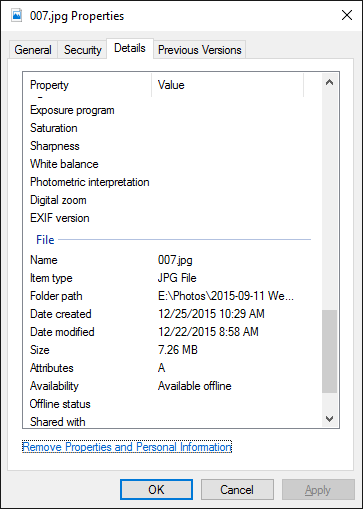
Thankfully, Windows 10 offers a simple method for removing all of this information from an image, which may be useful the next time you want to share your photos on Reddit, Flickr, or another platform.
This is what you do: Choose Properties with a right-click on the picture file. Locate the Remove Properties and Personal Information link at the bottom of the window by selecting the Details tab. Press it. Also dont forget to read about how to Spot Phishing Emails: This Google Quiz Will Help You
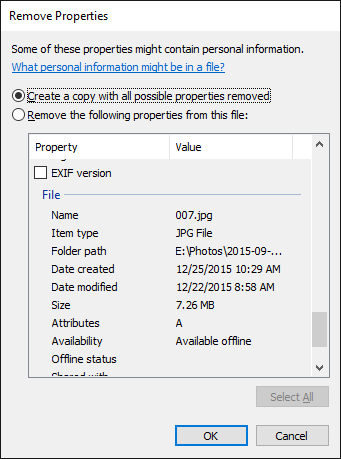
You now have two options: either make a separate copy of the image with all of its EXIF data removed, or remove specific EXIF data from the current photo. Once you’ve made up your mind, simply click OK. Completed!
You can try one of these other EXIF data removal techniques if that doesn’t work.
How frequently do you post pictures online? Do you ensure that EXIF data is eliminated before proceeding? Let us know in the comments!


Leave a comment